
Description
What You Will Learn
In this course, you will learn how to use ZONE3 to measure parts accurately and efficiently. Topics include:
• Powering up the system
• Lighting controls
• Video controls
• Part setup
• Datum and alignment
• Manual and automatic measurement tools
• Part programming
• Measurement result output
Course Overview
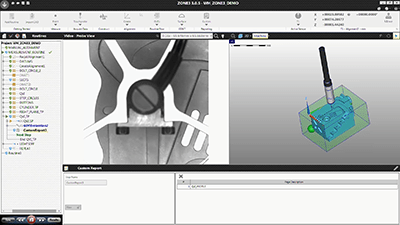
ZONE3 is a powerful, CAD-enabled 3D metrology software application. It enables users to measure parts quickly and accurately using a combination of advanced technologies, including optical, laser, and touch probe systems.
ZONE3 features a comprehensive set of image processing tools, geometric functions, ANSI/ISO tolerancing (including GD&T), and a robust graphical reporting engine.
The intuitive graphical user interface provides a real-time video display, an interactive model of the part under analysis, and dynamically updated measurement results.
ZONE3 also supports the import of CAD files in many popular formats, significantly reducing the time required to enter dimensions and build part routines. While ZONE3 is designed to work seamlessly with CAD data, it can also be used without a CAD file by creating part routines directly from sample parts to measure additional components.
Course Requirements
To use ZONE3, you should have basic computer experience and be familiar with the following:
• Starting up and using a personal computer (PC)
• Using Microsoft® Windows™
• Basic part measurement concepts
Before using ZONE3 on your QVI measurement system, you must be properly trained in:
• System safety
• System start-up and shutdown procedures
• System controls
Reviews
There are no reviews yet.